CutVoke: open-source AI video editor with an MCP server
CutVoke is a local-first desktop video editor with a built-in stdio MCP server. Claude Code, Codex, Cursor, Claude Desktop, or any MCP client can edit the project. You finish the same non-destructive, multi-track timeline by hand.
The source is MIT-licensed. Desktop packages also include third-party components under their own licenses, including GPLv3 FFmpeg, so the aggregate is not all MIT. Local editing needs no CutVoke account. An agent you connect may be a separate cloud service, with its own account, cost and data policy.
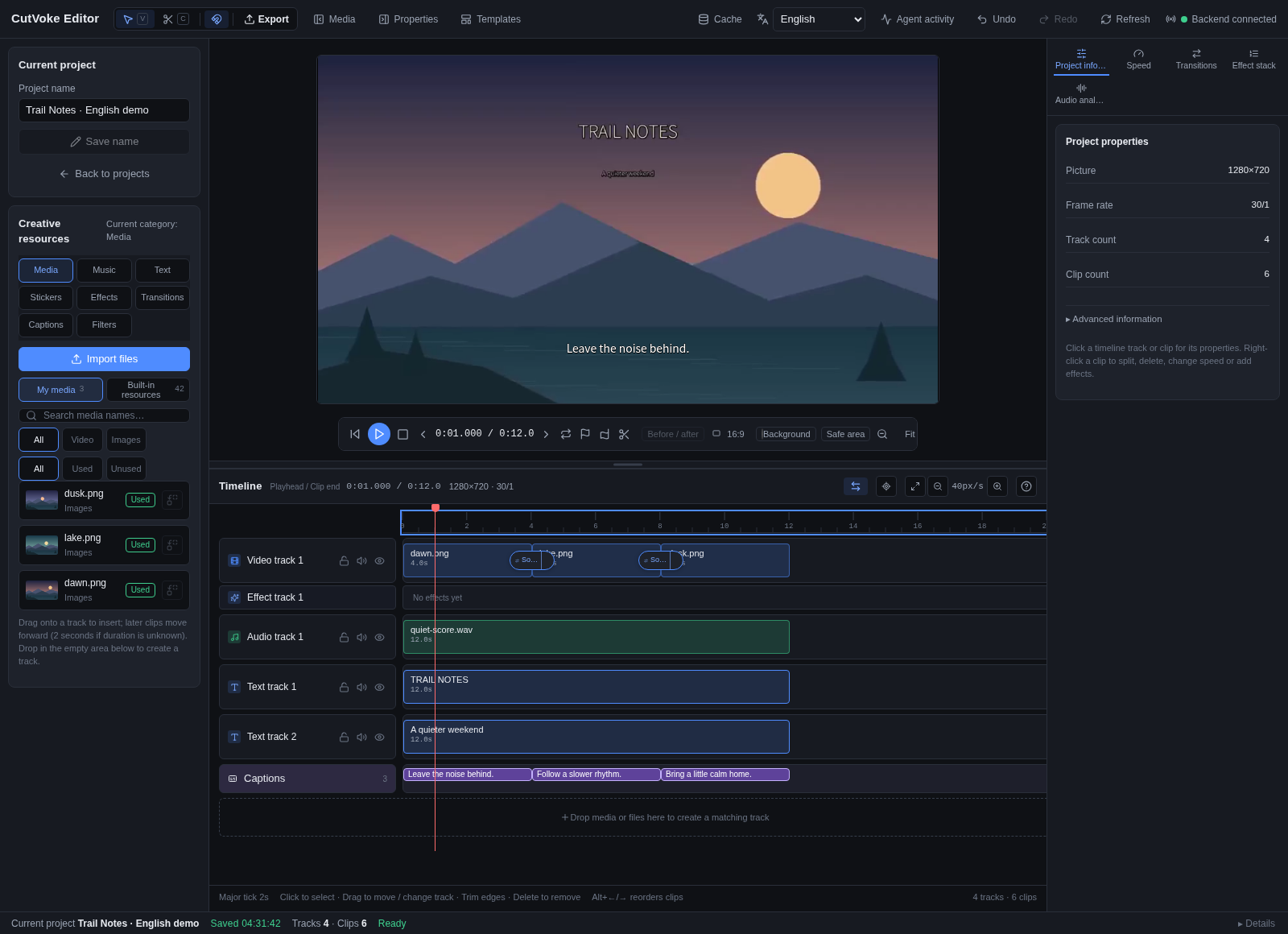
Editor overview from the repository docs. The Trail Notes picture is a project created by the repository demo script, not a claim about your footage.
Download the v0.3.6 preview
No Python or Node.js setup is required for the desktop packages. FFmpeg and ffprobe are included. Optional speech and person models are not.
| Platform | v0.3.6 package |
|---|---|
| Windows x64, portable | CutVoke-0.3.6-windows-x64-portable.zip |
| macOS, Apple Silicon | CutVoke-0.3.6-macos-arm64.zip |
| macOS, Intel | CutVoke-0.3.6-macos-x64.zip |
| Linux x64 | CutVoke-0.3.6-linux-x64.tar.gz |
SHA-256 checksums · Build and acceptance record · v0.3.6 release · All releases
v0.3.6 is a frozen preview, not current main. Later project-format migration and thumbnail-seeking changes are not in that download. macOS packages are ad-hoc signed, not Developer ID signed or notarized. Export-window reuse is disabled in all four packages. Some playback issues remain under investigation. Read the release limitations and the installation guide before you rely on a package.
Connect your agent in three steps
- Download CutVoke v0.3.6 and launch it once.
- Open
profile/mcp-config.jsonin the CutVoke data folder. Windows portable:CutVoke Datanext to the exe. macOS:~/Library/Application Support/CutVoke/. Linux:${XDG_DATA_HOME:-~/.local/share}/CutVoke/. The file already contains the bundled engine command, so no Python install is needed. - Add the
cutvokeentry to your agent: Claude Code, Codex or Cursor. Then ask: "Cut the silences, add captions, make a 9:16 version, and show me a few frames before you export."
That caption request needs the optional local ASR extra. The desktop package does not include it. While you set the client up, the same three guides cover Claude Desktop and any other MCP client: paste the mcpServers block from profile/mcp-config.json.
What you edit
- A multi-track timeline: video, audio, adjustment layers, pre-compositions, overlay stickers, motion titles and subtitle tracks, with non-destructive trimming. Basic editing · Advanced timeline
- Bezier keyframe animation, alpha and luma track mattes, and moving masks. Cinematic VFX · Moving masks
- Multi-track audio mixing and background-music ducking. Audio workbench
- Optional local captions and transcript cuts by word or sentence. Auto subtitles
- Optional local person-segmentation models (
cutvoke-person-model) and a local 3D engine. These models are not part of the basic offline download. Local 3D and models - A CLI, a local HTTP API, and the cutvoke-editor skill with guides for music videos, documentaries and vlogs, narrative shorts, explainers and product showcases.
Reusable effect recipes live in effects/. Flat timelines can be exchanged as FCPXML 1.10, OpenTimelineIO JSON or CMX 3600 EDL. Effects, keyframes and captions are not carried over. Details are on the CapCut alternative page.
FAQ
Can I edit video with Claude Code?
Yes. CutVoke ships a local stdio MCP server. Launch the desktop app once, copy the cutvoke entry from profile/mcp-config.json into Claude Code (setup guide), and ask for edits in plain language, for example "add captions, tighten the pauses and make a 9:16 version." The agent edits a real project timeline, which you can open and adjust in the CutVoke editor. Automatic captions need the optional faster-whisper extra, which is not bundled in the desktop packages.
Is there an open-source MCP server for video editing?
CutVoke is one: an MIT-licensed video editor whose MCP server exposes project, timeline, caption, preview and export tools to any MCP client (Claude Code, Codex, Cursor, Claude Desktop and others). It also has a CLI and a local HTTP API. See Local Delivery MCP. Desktop packages also include third-party components such as GPLv3 FFmpeg, so the download is not all MIT. See the license question below.
Can Codex or Cursor edit videos?
Yes, through the same MCP server. Per-client steps are on the Codex and Cursor page. Loading the bundled cutvoke-editor skill gives the agent the timeline schema plus workflow guides for music videos, documentaries and vlogs, narrative shorts, explainers and product showcases.
What happens if the AI makes a bad cut?
You fix it by hand. Agent edits land on the same non-destructive timeline as manual edits, so you can drag clips, retime captions or change keyframes in the visual editor instead of re-prompting. While an agent holds an editing lease, the editor shows it, and Take over editing hands control back to you. Agents can also call preview_compare to check before/after frames without committing a change.
Does CutVoke work offline?
Editing, previewing and FFmpeg export run on your computer, and local editing needs no account. FFmpeg and ffprobe are bundled in the desktop packages. The AI agent you connect (Claude Code, Codex, and others) may be a cloud service with its own account, cost and data policy. Optional local speech-to-text captions use faster-whisper. Models download once and can then run offline (local auto subtitles).
Is CutVoke free?
The source code is MIT-licensed and the desktop app needs no account or subscription. The desktop packages also include third-party components under their own licenses (for example, FFmpeg under GPLv3). Any AI service you connect is billed by that service, not by CutVoke.
How is CutVoke different from CapCut or DaVinci Resolve?
CapCut and DaVinci Resolve are mature editors built for hands-on editing, with large template and effect libraries. CutVoke is a younger, open-source preview built around one idea: an AI agent and a person working on the same editable timeline. Use it when you want an agent to do the rough cut, captions or versions and still control every clip yourself. Simple flat timelines can be exchanged as FCPXML 1.10, OpenTimelineIO or CMX 3600 EDL. Effects, keyframes and captions are not carried over. The comparison page lists what CutVoke does and does not do.
How is it different from AI video generators or FFmpeg MCP tools?
AI video generators return a finished MP4. FFmpeg-style MCP tools run one-off commands on files. CutVoke keeps a multi-track project — clips, captions, effects, keyframes — that both the agent and you can keep editing, then renders it locally with FFmpeg.
Can it generate subtitles automatically?
Yes, with the optional local ASR add-on (faster-whisper). Results arrive as a draft you can correct, then become an editable subtitle track you can restyle, cut by word or sentence, export as SRT, or burn into the MP4 export. The auto subtitles page summarizes the Local ASR guide, which is written in Chinese. faster-whisper is not bundled in the desktop packages.
Which platforms are supported?
Windows x64 (portable), macOS on Apple Silicon and Intel, and Linux x64. Current builds are previews. macOS packages are ad-hoc signed, not notarized. See the latest release for limitations.
These answers follow the README FAQ. Per-client setup is in the repository's integration guides.